Getting started · 5 min read
Import a Ren'Py visual novel into Pominis
Turn a Ren'Py game into a story that plays in a browser: what the import keeps, the steps in the Import a game dialog, and what does not convert.
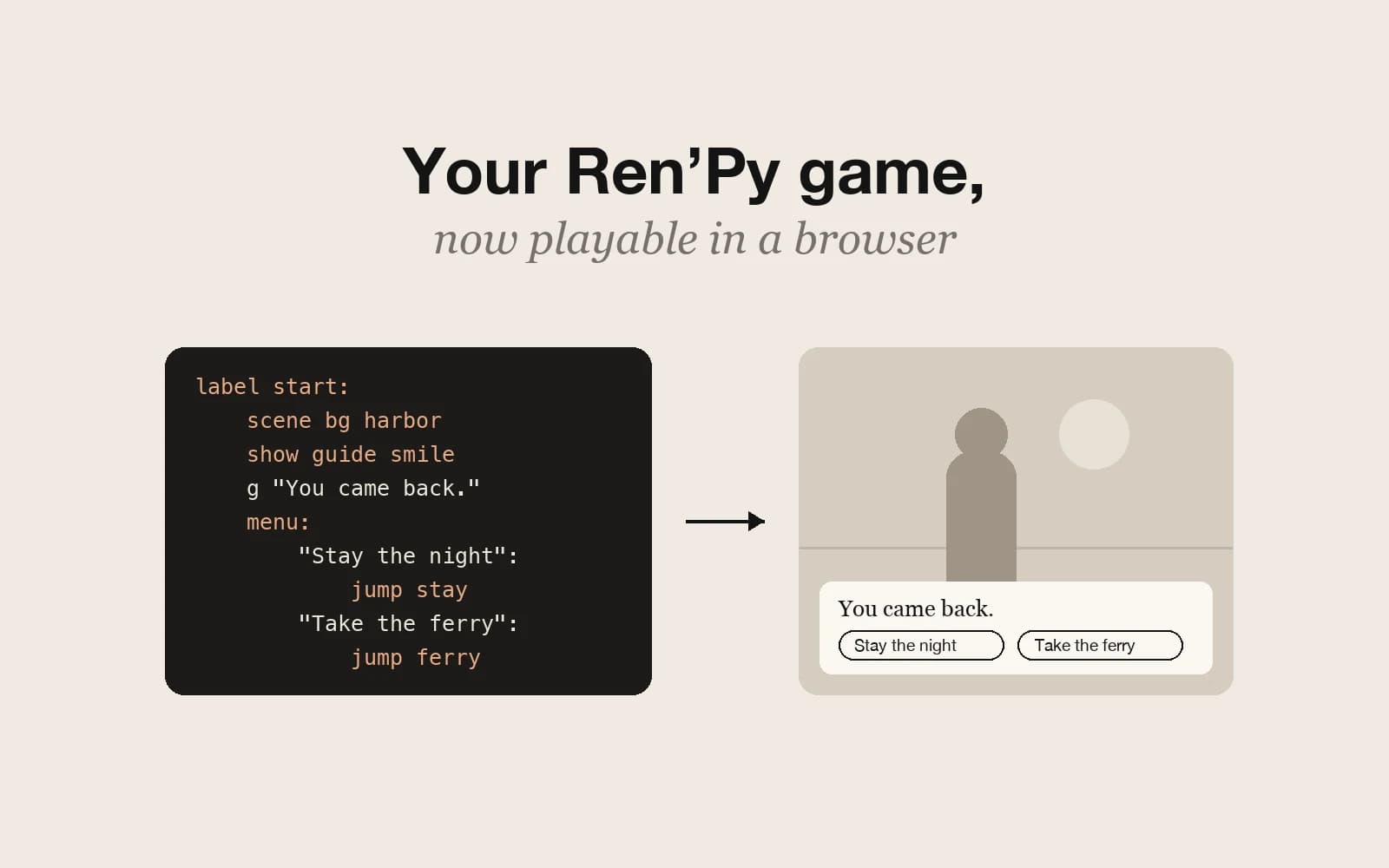
If you have finished, or half-finished, a visual novel in Ren'Py, you can bring it into Pominis instead of rebuilding it. The import reads the game's scripts and files and turns them into an ordinary Pominis project, with scenes, choices, variables, endings, art, and music, that plays in a browser and that you can keep editing with the agent. It is a port of what the script does, not an emulator for the Ren'Py engine, so it is worth knowing where that line falls before you upload.
The running example is invented: a short harbor-town story called Last Ferry, written in Ren'Py, with one choice that decides whether the player stays the night or leaves, a trust variable, and a Japanese translation in the game's tl folder.
What the import keeps
- Dialogue and narration, with each speaker named as in its Character definition.
- Menus, as choices, including choices that only appear when a condition is true.
- Labels, jump, and call, as the links between scenes. Long labels are split into several scenes, and labels named like chapter_1 or day2 become chapters.
- Variables and conditions: $ assignments and if, elif, and else blocks become story variables and conditional routes.
- Endings: a scene with nowhere left to go becomes an ending, titled from its label where possible.
- Art: for each scene, the background and the sprites shown with scene and show are composited into one image, placed where the original put them. Layered images are flattened.
- Characters: each one gets a portrait cropped from one of its sprites and a written description to work from later.
- Music started with play music, uploaded as the story’s own tracks.
Translations get special handling. If the game has translation folders under game/tl, the import uses the one that matches the language you use Pominis in, when there is one. Import Last Ferry with Pominis set to Japanese and you get its Japanese text; import it in English and you get the original script.
label harbor_night:
    scene bg harbor_dusk
    show aoi worried at right
    a "The last ferry leaves at nine."
    menu:
        "Stay the night":
            $ trust += 1
            jump inn
        "Take the ferry" if ticket:
            jump ferry
In Pominis, the harbor background and Aoi’s sprite become one scene image, her line becomes dialogue, and the menu becomes two choices. The second choice keeps its ticket condition, and choosing to stay still raises trust for the checks that come later.
Import the game, step by step
- Pack the game as one .zip file. The downloaded build of a game works, as long as it contains the .rpy source scripts in its game folder; .rpa archives inside the zip are unpacked. A game that ships only compiled .rpyc files cannot be imported, and encrypted zips are rejected. Each file can be up to 1.5 GB.
- Open the importer. On the workspace home, choose Import a game under Other ways to start; on the Projects page, use the Import a game button; or attach the zip in the prompt box. Attaching it in the VN Studio chat works too: the game becomes a new project, and the one you have open is not changed.
- Fill in the dialog. Story name can stay empty to use the game’s own title. Credit (optional) is for the author and license, for example “By Jane Doe, CC BY 4.0”, and it is added to the first chapter’s description.
- Confirm your rights. Import stays disabled until you tick the box saying you have the right to adapt and publish the game: you made it, or its license allows adaptations, such as CC0 or CC BY.
- Follow the progress: Uploading, Unpacking the game, Reading the script, Drawing scenes, Adding music, Setting up characters, Naming choices, and Saving the project. Keep the page open until the upload finishes; after that you can choose Continue in background, and the project appears in Projects when it is ready.
When the import finishes, the project opens in VN Studio. It is a draft like any other, so nothing is published until you publish it, and the uploaded archive is deleted once the import has run.
Limits worth knowing first
- One import at a time per account. If one is still running, wait for it to finish before starting the next.
- An import that runs longer than 30 minutes is stopped. Very large games may need to be split into parts.
- Sound effects, voice lines, and movies are not carried over; only music is.
- Transitions, pauses, and animation are dropped. Sprite positions are read, but motion is not.
- Custom screens and minigames do not run. Where a screen’s buttons or hotspots jump to a label, they become choices, named from the button text or, for image-only buttons, with a short generated action name.
- Python beyond simple variable assignments and conditions, persistent data, and direct calls into the engine are skipped.
- The full-page text layout of NVL mode is not reproduced, and character name colors are not kept.
The import does not show a list of what it skipped. Play the project from the beginning and compare it with the original, especially around minigames, custom menus, and scenes that relied on timing or sound.
Keep working with the agent
Once the story is in Pominis, it is an ordinary project that the agent can edit, translate, or continue. Ask for what the port could not carry: “The storm scene has no sound now; give it a quiet rain track.” “Rewrite the inn scene so Aoi explains why she is leaving.” “Translate the story into Chinese.” “Add a second chapter that continues from the ferry ending.” New images, videos, and writing from the agent spend credits as usual; the port itself reuses the game’s own art rather than generating new pictures.
Some fixes are faster by hand. Open a scene with Edit scene to change a line or where a choice leads. If the original swapped a sprite’s expression in the middle of a scene, check that the composited image still matches what the dialogue says, and play every route before you publish.
Only import what you may adapt
The rights box is not a formality. Import your own games, or games whose license explicitly allows adaptations, and use the Credit field to keep the author and license with the story. A downloaded commercial game does not become yours to publish because it imports cleanly.